
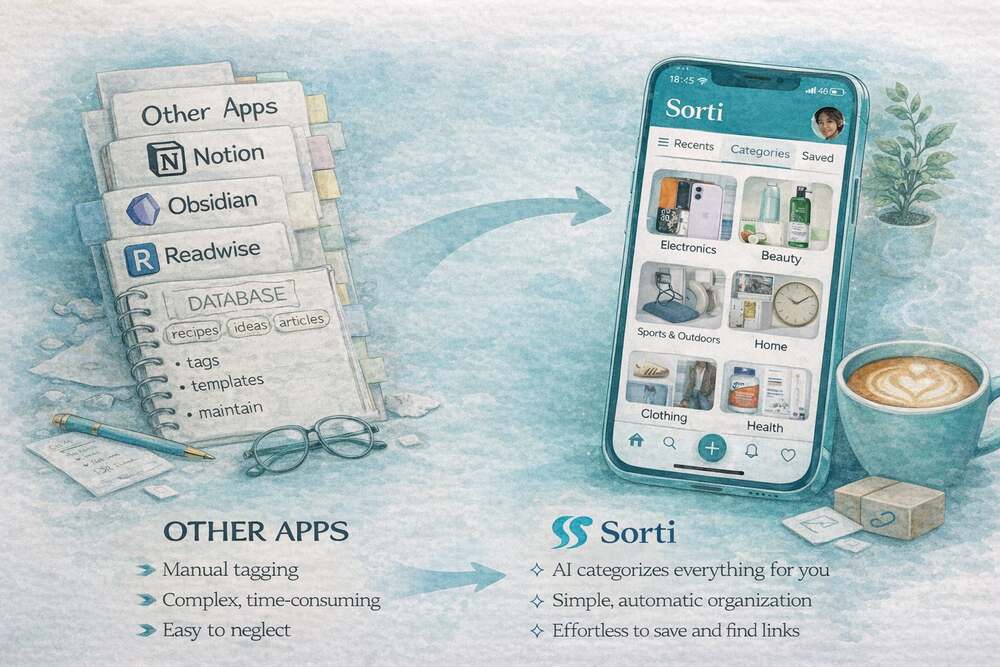
Second brain apps have been having a moment. Notion. Obsidian. Roam Research. The idea is beautiful: an external digital brain that captures your thoughts, links, and ideas so you never lose anything.
But if you've ever actually tried to use Notion as your second brain for saving links from Instagram, you already know the problem. It doesn't work for that.
What Second Brain Apps Are Actually Built For
Apps like Notion, Obsidian, and Logseq are built for structured knowledge work. They're incredibly powerful for long-form note-taking, project management, building internal wikis and databases, and helping writers, researchers, and developers organize complex information.
They are not built for the way most people actually save things on their phones.
You're not sitting at a desktop building a structured knowledge base when you screenshot a product from TikTok. You're on your couch. You have two seconds. You want to save it and move on.
Second brain apps require intention. You have to decide which database to put it in, what tags to apply, what properties to fill out. That's fine if you're building a personal wiki. It's a complete blocker when you're trying to save a recipe you saw in someone's story before it disappears.
Where Second Brain Apps Fall Short for Everyday Saves
They don't process screenshots. Notion can store a screenshot, but it won't read it. It won't extract the product name, the price, the recipe ingredients, or the restaurant name. It's just a file sitting in a database.
Feature Comparison: Second Brain Apps vs. Sorti
| Feature | Second Brains (Notion, Obsidian) | Sorti | |---------|---------------------------------|-------| | **Primary Use Case** | Structured knowledge work, writing, wikis | Everyday saves, screenshots, social links | | **Organization** | 100% Manual (databases, folders, tags) | 100% Automatic (AI categorization) | | **Screenshot Processing** | Stores as image | Reads text, identifies products, extracts context | | **Speed to Save** | High friction (requires deciding location) | Instant (share sheet -> done) | | **Search** | Keyword-based | Semantic & Meaning-based | | **Link Context** | Saves URL, maybe a preview | Preserves original source, app-aware routing |
They don't auto-categorize. You have to manually sort everything. That means the system only works if you're disciplined enough to maintain it, and most people aren't, because life is busy.
They're designed for desktop-first workflows. Yes, Notion has a mobile app. But the experience of quickly saving something from Instagram into Notion involves enough friction that most people just don't do it.
They don't have semantic search. You can search Notion by keywords, but if you saved something and forgot what you called it, you're stuck. Sorti searches by meaning, you can type "red dress Italy" and find a screenshot of a red dress you wanted to wear on your Rome trip, even if those exact words never appeared in the save.
They're not free-tier friendly for power users. Notion's free plan limits pages and features. Building a real link library hits those limits fast.
What Sorti Does Differently
Sorti isn't a second brain. It's a first-action tool.
The design goal isn't to build a comprehensive knowledge system. It's to make sure that when you save something, anything, from anywhere, you can find it and act on it when the moment comes.
Automatic categorization means you screenshot a recipe and Sorti files it under Recipes. You save a product link and it goes to Shopping. A place recommendation goes to Travel. An outfit from a Reel goes to Fashion. You do nothing. Sorti handles the organization.
OCR plus AI reading means Sorti doesn't just store your saves, it reads them. It extracts the brand name from a screenshot, the ingredients from a recipe image, the location from a travel post. All of that becomes searchable.
Built for mobile-first saving means you open Instagram, see something you love, screenshot it or share it to Sorti. Done. No database decisions, no tag taxonomy, no friction.
Everything in one place means screenshots, links, TikTok saves, Instagram posts, browser bookmarks, things people sent you in texts, all one library, all organized the same way, all searchable together.
Who Should Use What
Use a second brain app like Notion or Obsidian if you're doing structured knowledge work such as research, writing, or learning. If you want to build a personal wiki or project database. If you're willing to invest time in maintaining an organizational system. If your saving workflow is mostly from the desktop.
Use Sorti if you save things constantly from your phone, Instagram, TikTok, texts, screenshots. If you've tried bookmarking and still can't find things later. If you want zero-effort organization where the AI does it for you. If your saves span multiple categories, shopping, food, travel, fashion, fitness. If you're tired of losing things you actually wanted to do.
The Bottom Line
Second brain apps are powerful. But they're not designed for the way most of us actually save things, impulsively, quickly, on our phones, from social media.
Sorti is. It's built specifically for the behavior of saving on the go, and for the frustration of losing things you actually cared about. You don't need to become more organized. You need a tool that's organized for you.
Download Sorti free, iOS and Android.